Saturday, 30 July 2016

Private Note is important for everyone

Hii readers,
              I want to tell you about private note service it is very useful!!
          Sometimes, we want to share private information with someone else could be an ATM pin, bank password, email id password and so on.


 But we also want that we don't leave any record of it anywhere. Using email,chat or sms will leave a record of the information sent on both devices - instead, you can use PrivNote.
By using it when we send a text note to anyone else using email, MS or chat and ywe can set the note to be deleted as soon as it gets read. We can even encrypt the note with a password for added security as well as have the website send you an email when the note is destroyed.
We can even choose to have the note destroy after a specific time(1 hour, 2 hr,  4 hr, 24 hr, 5 days or 20 days).

Monday, 18 July 2016

Difference between ICT and Educational Technology

Use of Information and Communications Technology (ICT) in Education
  1. Modern developments in information and communication technologies (ICT) provide exciting possibilities to enhance the quality of education. Interactive education software, open access digital libraries, and cheaper and more intuitive technology may facilitate new forms of interaction between students, teachers, education employees and the community and enhance the quality of education by making it more accessible.
  2. Education may be enriched by integrating such technologies into traditional educational activities. However, it must be recognised that ITC may never displace the relationship between teacher and learner which is crucial to the learning and development process.
  3. ICT has the capacity to enhance the learning process and facilitate communications within education institutions and between educators and learners but it must be used in education institutions under the supervision of qualified well-trained professionals with the expertise in pedagogy and in education to ensure that its impact does not damage or undermine the learning process or the development of learners.
  4. Education unions should
  • (i) support the use of ICT as an integral part of the provision of quality education for all. They should advocate for the use of ICT in education as a key modern aid to teaching and learning;
  • (ii) advocate for free access for all teachers and learners, support professionals and administrators in education, to high quality dedicated ICT;
  • (iii) insist that ICT in education is appropriate to the learning requirements in the curriculum in each subject, is supportive of the work of teachers and learners, and of administrative and professional staff in education;
  • (iv) insist that educators are consulted about the introduction of ICT into education institutions and involved in the design and development of appropriate ICT for education purposes;
  • (v) monitor the implementation of any agreements entered into by governments, national education or school authorities for the provision of ICT by commercial companies.
But this doesn’t mean that educational technology is same as ICT. It is different from each other by following reasons:

  • Educational technology(also called learning technology) is the study and ethical practice of facilitating learning and improving performance by creating, using and managing appropriate technological processes and resources.  educational technology includes other systems used in the process of developing human capability. Educational Technology includes, but is not limited to, software, hardware, as well as Internet applications and activities. Whereas ICT are only a part of a continuum of technologies, starting with chalk and books, all of which can support and enrich learning. ICT, as any tools, must be considered as such, and used and adapted to serve educational goals.The purpose of ICT in education is generally to familiarise students with the use and workings of computers and softwares.
  • Educational technology can be considered either as a design science or as a collection of different research interests addressing fundamental issues of learning, teaching and social organization. it only aims at increased efficiency or effectiveness of current practise, but frequently it aims at pedagogical change. Whereas ICT in education can be broadly categorized in the following ways
  • ICT as a subject (i.e., computer studies)
  • ICT as a tool to support traditional subjects (i.e., computer-based learning, presentation, research)
  • ICT as an administrative tool (i.e., education management information systems/EMIS)

Technology is Important


We live in a dynamic world surrounded by almost endless amounts of information. Riding the coattails of information is all of the technology we have at our fingertips. For as prevalent as technology is now, is it replacing real lasting education? Does technology have a place in our classrooms?
I think any level-headed educator would agree that children must be able to use technology to be competitive in the workplace after graduation. With all the trends and advancements in technology no one can argue that we will go backwards from here. I don’t foresee technology replacing passionate teachers educating their students. I simply see it as an important tool to help the education process and prepare students for the future.
From the studies I’ve read, teachers want to use more technology in the classroom. The kids seem to really enjoy it and are excited about using it. Those interested in embracing technology need to educate themselves on what’s out there. Here is a small sliver of the advantages we gain from using technology to educate people.
Equality: School districts across the country are not created equal. There is so much disparity in educational resources depending on the wealth, or lack thereof, depending on certain areas. Students using technology in low income districts gain significant skills and advantages in the learning process. Using the same technology is an equalizer for disadvantaged students.
Future: The world is moving towards technology at a breakneck pace. Educators have a responsibility to introduce, encourage, and help students master technology, as well as subjects, as it applies to school and the future. Technology will be used in every aspect of the professional lives of current students. So upon graduation, whether the next step is college or career, technology will be used daily. Why not use it daily in school?
Mobile: Using technology the classroom can be taken anywhere. With all the knowledge and resources contained and deliverable on demand in a mobile device, students can learn at home or in the “field”. Mobile technology allows for greater collaboration between students promoting strong foundations in group work.
Motivation: Technology tracks and reports student’s progress instantly. What fun is running a marathon if you don’t know how long it takes. Runners can get instant feedback for hundreds of data points as to their condition. This feedback provides instant motivation to improve performance.
Similarly students who use technology are motivated to improve performance. Just like they do at home on their gaming consoles. Trying to beat high scores at home and trying to beat high scores in math use the same psychology.
Social: This runs along the same lines as motivation. Creating a social element to educational technology can allow for healthy competition amongst peers both in the same classroom or across the country. Performing well and earning badges to gain virtual social status is of the heart of many social applications today. Personal identities do not have to be used, instead students could use avatars to hide possible confidentiality breaches. Using technology to make education have social elements can make learning very addictive.
Savings: The savings which result from using technology can come in many facets. On a basic level technology can replace infrastructure. Desks, books, lab equipment and other items are a heavy cost burden on schools everywhere. Technology and devices can help save on these costs. In addition geographically isolated or economically disadvantaged children can benefit from access to online software or resources which would be cost prohibitive without technology.
Updates: I recently read an article that reported students using 10 year old textbook in school. Updating textbooks can cost lots of money and do significant damage to budgets. On the other hand, updating software and educational content is not as expensive or cumbersome. With the help of technology course curriculum can reflect real world data. In some applications students can be exposed to real-time information.
Assessments: Assessing students performance can be done instantly with technology. It’s more than just test scores, simply understanding students grasp of the subject in real time can be done on tablets in classrooms. A classroom could be questioned with a multiple-choice problem. Students could then input their answer and the feedback score is instantly given to the student and teacher. Corrections can be made long before examinations.
Global: Students and classrooms or even schools can be connected to anyone in the world instantly. Devices coupled with the Internet can allow for a free way to communicate globally. The chance to understand international or different cultural perspectives on the same topic is incredible.
Convenience: Having children carry heavy backpacks, text books, and binders isn’t very efficient. A new lightweight laptop weighs less than 5 pounds and can have an internal storage capability of more than 2 million illustrated pages. In addition to an internal hard drive, access to the Internet can provide an almost unlimited source of information. Ergonomic issues and back pain are a real problem in children. These conditions can lead to chronic problems throughout adulthood.

Crack Passwords


Usually, for changing the passwords, we go to User Accounts in Control Panel and then opt for changing the passwords. But windows doesn’t permit us to do so, till we enter the previous password.
So, it’s clear that we can’t change the password from this method because the current password is also required here, which we don’t know.
But, the same thing can become possible, if perform the same task through Windows Command Prompt(CMD). In this method, we are not prompted to enter the current/old password. But for that, we first need to be logged in as an Administrator(see step 2 below), unless you will be shown an error message stating “Sytem 5 Error”. So, I don’t want you to get this “System 5 Error”, that’s why I was focussing on this point. This hack is very easy. You are only required to perform my all steps, in the exact manner. If you still get any problem, then you can drop your comments below this article. The steps are as follows :-
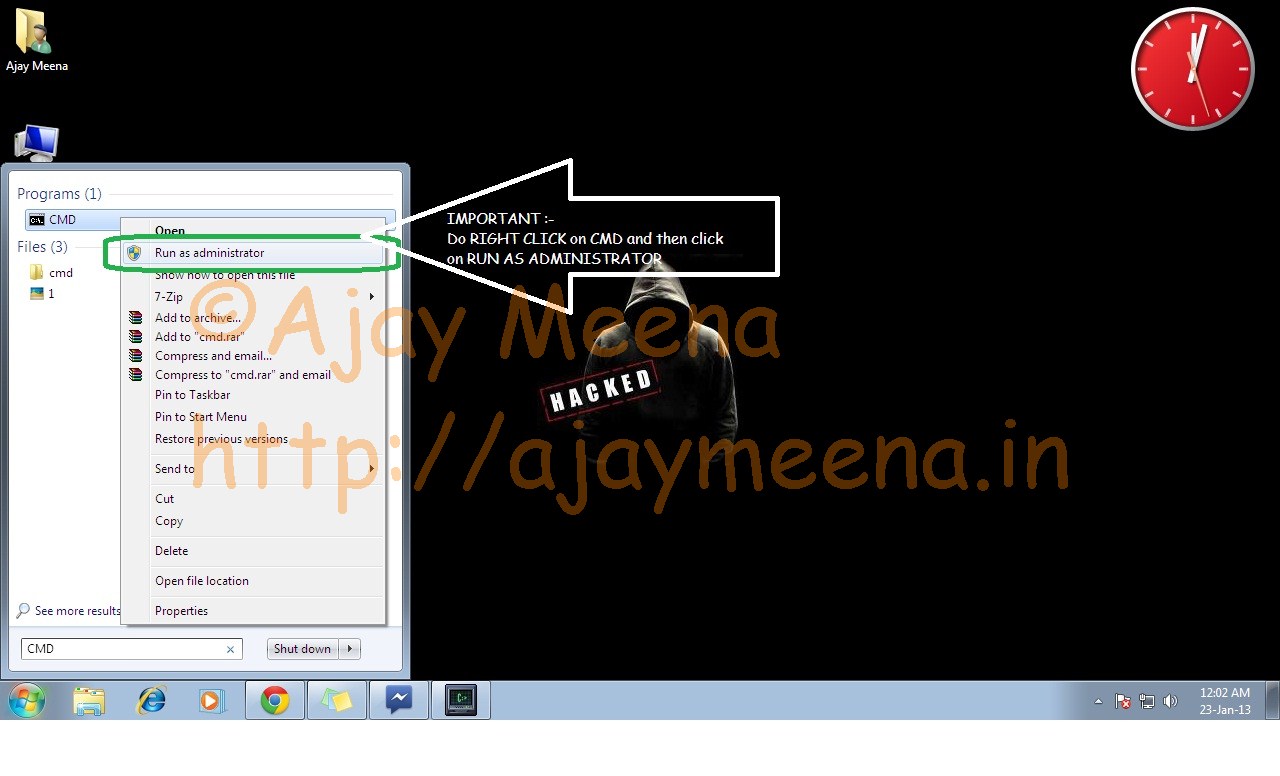
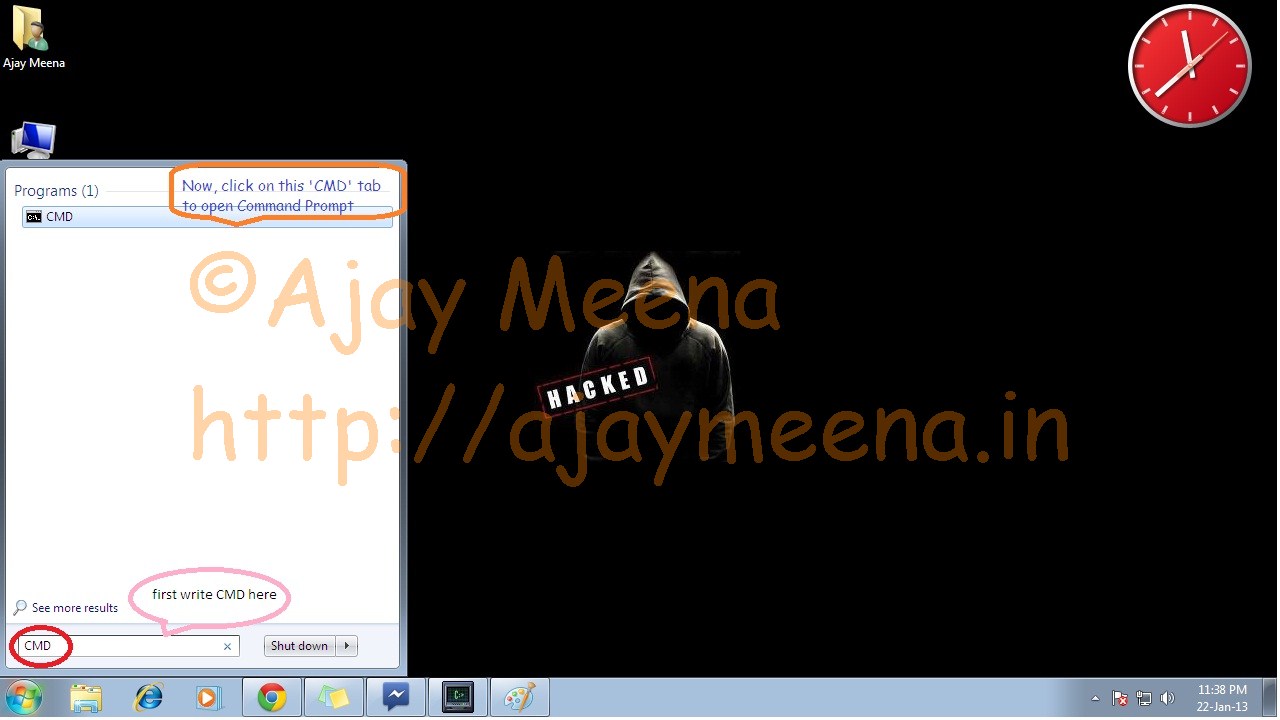
Step-1 :- Press start, and search CMD(windows command prompt).
Step-2 :- Now, do right click on CMD and select RUN AS ADMINISTRATOR(it’s the most important step of this hack, unless “System 5 Error” will be shown in the end) and then click OK. Most of the users don’t read the whole sentence and press Enter right after searching CMD in this step. Those users get an error named “System 5 Error”. So, please don’t press Enter directly on CMD.
This hack only works when you’re logged in to the Administrator(or administrator like) account.This hack need Administrator(or administrator like) priviledges, unless it shows “System 5 Error”. This hack is thus NOT POSSIBLE if you are logged in with the GUEST ACCOUNT. If you want to crack the admin password without been logged in, then also, there’re lot of ways of doing that. I will post one of the easiest very soon. You will then be able to crack the admin password without been logged into the system. It would hardly take 5 minutes to crack admin password with that method.
Changing Administrator Password using Command Prompt(CMD)_2
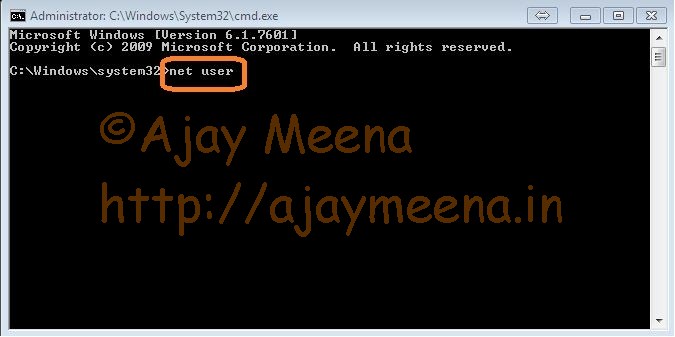
Step-3 :- Now type the command NET  USER

(here, there’s a SPACE between NET and USER)
Changing Administrator Password using Command Prompt(CMD)_3

and  press ENTER It will give u the names of all the USER accounts existing in your computer.
Changing Administrator Password using Command Prompt(CMD)_1

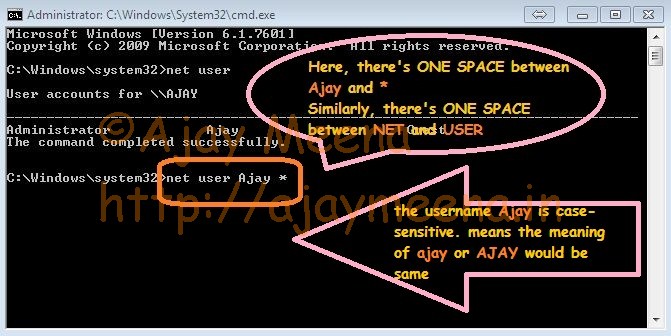
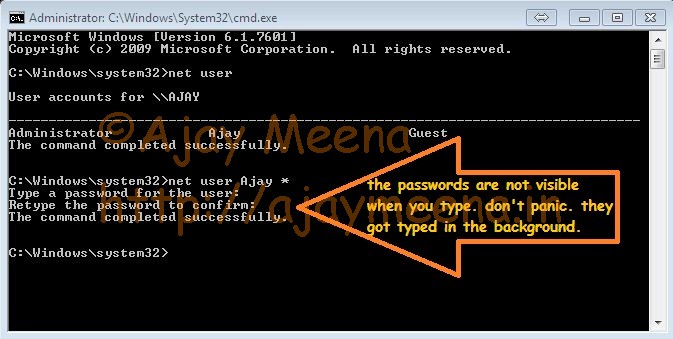
Step-4 :- Here, in this pic, you are getting three names, which are Administrator, Ajay and Guest. We are not at all interested in the Guest account for sure. So leave that. Now the two accounts are left. One is Administrator and the other is Ajay. Here, the both the accounts are having admin privileges. In most of the cases the main admin account, which is ‘ADMINISTRATOR’ here, is hidden. And the other account, named ‘AJAY’ here, is shown, which is a ADMIN-LIKE account. So, this account also have full admin priviledges. Because only one admin account which is visible here is ‘AJAY’, so we will deal with this account in this process. So, now use our next command, which is net user Ajay * Here, there’s ONE SPACE between NET and USER as well as between AJAY and * Changing Administrator Password using Command Prompt(CMD)_5

Step-5 :- Here u are, now directly enter the new ADMINISTRATOR PASSWORD and press enter again confirm ur new password and press enter. You will not see any ************* type of characters in the CMD window when you will be typing your password. But you don’t worry. They are not visible but they got typed. Re-type the same password in Confirm Password option.
Changing Administrator Password using Command Prompt(CMD)_6
Step-6 : U are done. Just type EXIT and then press ENTER to exit. That’s all.
NOTE :- This method is NOT applicable, if you are using GUEST account. It will only work, when you are already logged into admin account.
The application of this method comes into use when you want to change your friend’s admin password, who would have been logged in through his admin account for sure. If he has gone somewhere for sometime, then you can change his pc admin password within seconds for fun. You can surely impress him/her with this small trick.
I will soon post the method for cracking the Windows admin password without been logged in with any account. That is admin password can also be cracked. Stay tuned..
…………..
I hope you would find my post beneficial for you. Although I have included all the smallest to smallest steps in the post. But still if you encounter any problem, then do tell me. You can comment below your queries.
All of your queries will be answered within an hour, or even more sooner.
If you don’t encounter any problems and find my post great, then please don’t forget to appreciate it. You can also share my post.